
Instructions
What an instruction is, how to create one, change it and switch it on.
Instructions
An instruction tells maesense how to mark messages: which themes there are, what belongs to each of them, and how to set the sentiment and the author. Tagging sessions mark messages by the version of the instruction that is in work.
What I want to do
- Create an instruction: describe the task, choose the themes and mark a few messages yourself. See Create an instruction.
- Change an instruction: correct a theme, add a rule, switch the new version on or bring an old one back. See Change an instruction and switch it on.
- Check that a change is for the better: mark samples and compare the draft with the version in work. See Samples and the check.
The list of instructions
The list opens on active instructions. To see drafts and archived ones, choose All; on a phone the statuses are in a drop-down list. Themes and rules under the name opens the instruction.
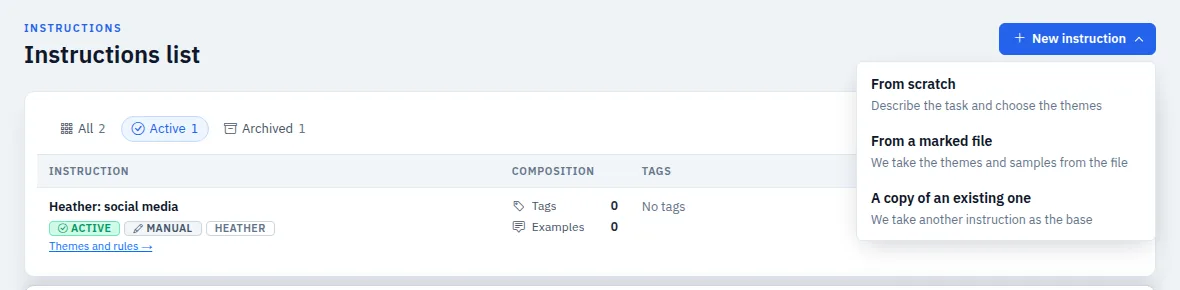
New instruction offers three ways:
- From scratch: you describe the task and choose the themes.
- From a marked file: the themes and samples come from a file where people already marked the messages.
- A copy of an existing one: another instruction becomes the base.
If you stopped halfway, the instruction is at the top of the list with the Continue link. It goes on from the step where you stopped.
Words on the screens
- Theme: what a message is about. Every theme has two lines: Belongs here and Does not belong here. Themes can be put into groups.
- Rule: a short clarification for borderline cases, for example: “Queues belong to Service, not to Atmosphere.”
- Samples: messages you marked yourself. A new version is checked on them before it is switched on.
- Draft: changes that are not in work yet. Sessions use the version in work until you press Switch on.